Why Backups Fail: How to Avoid a Business Data Disaster
Most businesses assume their backups work.
Warning alarms don’t go off when a data backup fails. Everything appears fine until you try to restore a file and discover the backup is corrupt or missing entirely.
That moment is not just frustrating. It can be catastrophic.
If you read our post about how Pixar nearly lost Toy Story 2 in a massive deletion incident, you know even world class teams can get data backups wrong. The difference between a close call and a company ending event often comes down to one thing. Backup reliability.
Let’s break down why backups fail, real world examples of failure, and how your business can avoid becoming the next cautionary tale.
What Is a Backup Failure
A backup failure happens when your data recovery system does not successfully restore usable data when needed.
That failure can take several forms:
- Backups never ran successfully
- Backups ran but data was incomplete
- Backup files became corrupted
- Backup storage failed
- Credentials expired and no one noticed
- Ransomware encrypted both production data and backups
According to IBM’s 2023 Cost of a Data Breach Report, the global average cost of a data breach reached 4.45 million dollars. While breaches and backup failures are not identical events, the recovery costs often overlap when data cannot be recovered. Downtime, legal exposure, lost customer trust, and operating disruption all escalate quickly.
A backup is only valuable if it restores clean, complete, usable data.
Why Backups Fail
1. No One Monitors Them
Many businesses assume backups are automatic and therefore safe. Automated systems still require monitoring.
Pixar’s Toy Story 2 incident happened in part because their backup system had quietly stopped functioning properly. No one realized until a mass deletion occurred. Fortunately, an offsite copy saved them.
If no one reviews logs or alerts, backup failures can go undetected for months.
2. Storage Fills Up
Backup systems need space. When storage fills up, backups fail or overwrite older versions.
This is common in on premise systems where storage expansion was never revisited after initial deployment. As businesses grow, so does data volume. Without proactive capacity planning, backups silently fail.
3. Settings Not Configured Correctly
Incorrect retention settings, excluded folders, or failed agent installations can create dangerous blind spots.
For example, Veeam’s Data Protection Trends Report consistently shows that many organizations experience gaps between perceived ability to recover data and actual ability to recover data.
Configuration errors often remain invisible until disaster strikes.
4. Backup and Production Are in the Same Place
If your backup lives on the same server as your production data, you do not have a backup. You have a duplicate vulnerability.
Isolated, immutable, offsite backups are essential to withstand modern threats.
5. Backups Are Never Tested
This is the most common and most preventable failure. A backup strategy without restoring tests is a hope strategy.
Testing confirms:
- Files restore correctly
- Applications launch successfully
- Databases remain intact
- Recovery time objectives are realistic
Without testing, your first restore attempt may happen during your worst crisis. That is not the time for surprises.
Real World Backup Failures
GitLab Database Deletion
In 2017, GitLab experienced a major outage after an accidental database deletion. Backup systems existed, but recovery was slow and incomplete because of replication and backup design flaws. GitLab documented the event publicly, showing how tech companies can struggle with restoring complexity.
University of Calgary Ransomware
The University of Calgary paid a ransom of approximately 20,000 Canadian dollars in 2016 after ransomware impacted internal systems. According to reporting by the CBC, recovery involved significant operating disruptions.
While not all details focused solely on backup failure, the event illustrates the cost of insufficient recovery readiness.
Ransomware recovery is not just about paying or not paying. Recovery is about whether you can restore data safely and quickly.
The 3 2 1 Backup Rule Still Works
Despite evolving threats, the classic 3 2 1 rule remains foundational:
- 3 copies of your data
- 2 different media types
- 1 offsite copy
Modern variations also recommend one immutable copy that cannot be altered or encrypted.
Cloud backup, hybrid environments, and managed services make this more accessible than ever.
If you want a deeper look at backup strategies, explore our data protection and disaster recovery insights at 4BIS.
How to Prevent Backup Failure
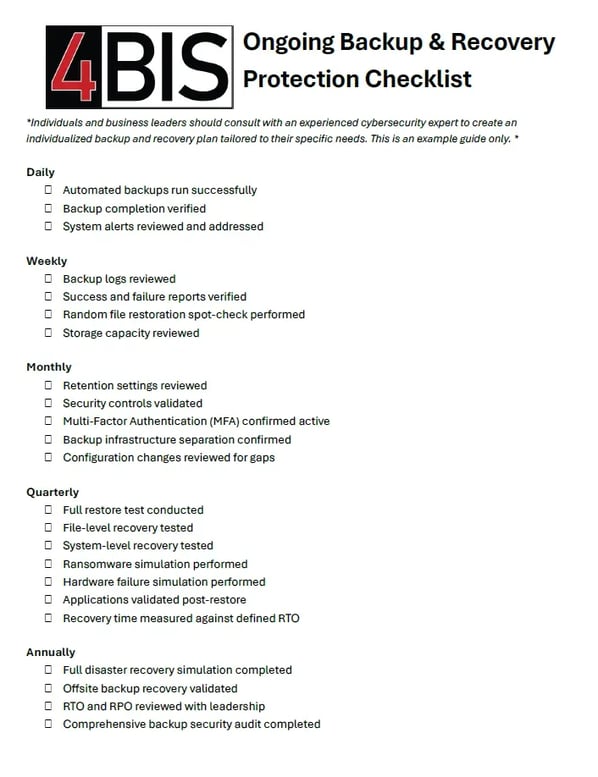
Here are practical tips you can implement now to ensure you have a usable data backup.
Monitor Daily
Assign ownership to a staff person. Someone must review backup reports at least weekly. Automated alerts should escalate failures immediately.
Silence is not confidence.
Test Restores Quarterly
Run full restore tests at least quarterly. Include file level and system level recovery.
Simulate real world scenarios:
- Server failure
- Ransomware event
- Accidental deletion
If you cannot restore confidently, adjust immediately.
Separate Backup Infrastructure
Store backups separately from production systems. Use cloud or secure offsite replication.
Consider immutable storage options that prevent deletion or encryption.
Protect Backup Credentials
Multi factor authentication for backup consoles is critical. Many ransomware groups specifically target backup admin accounts.
Document Recovery Objectives
Align technology with business tolerance for downtime.
Define and understand Recovery Time Objective (RTO) and Recovery Point Objective (RPO). If leadership cannot define acceptable downtime, your recovery plan lacks clarity. To assist with this planning, read more about RTO and RPO.
Human Error Is Always a Factor
Research from Stanford University and Tessian suggests that human error contributes to most cybersecurity incidents.
Some examples include: accidental deletion, misconfiguration and clicking on a malicious link. Your backup strategy must assume mistakes will happen.
If your entire organization depends on everyone doing everything perfectly forever, you are relying on luck.
Luck eventually runs out.
Managed Backup and Monitoring
Many small and mid-sized businesses lack internal IT teams dedicated to backup oversight.
That is where managed services help. A managed IT and cybersecurity partner can:
- Monitor backups continuously
- Test restores regularly
- Harden backup environments
- Align strategy with compliance requirements
- Respond immediately to anomalies
At 4BIS, we work with businesses to ensure their backup strategy supports business continuity, not just technical compliance. You can learn more about our managed IT services and cybersecurity solutions on our website.
Backup Is About Business Continuity
Backup failure is rarely just an IT issue. Backup failiure is a business risk.
When backups fail, operations halt, revenue stops and customers question reliability.
A functioning backup strategy protects:
- Financial stability
- Brand reputation
- Regulatory compliance
- Operational continuity
It is not glamorous. It does not generate headlines when it works. But when data backups fail, you will notice.
Final Thought
The most dangerous phrase in cybersecurity is this, “I think it is backing up.”
Do not assume or think that the backup will work. Verify consistently that the backup works.
If you are unsure whether your backups will survive a ransomware attack, hardware failure, or human error, now is the time to uncover issues before a crisis occurs.
Call to Action
Schedule a backup and disaster recovery assessment with 4BIS today to have confidence in your plan. We will review your current environment, identify gaps, and help you build a strategy that works when you need it most.
Because the only good backup is the one you never have to panic about.