What Is a Spam Bomb? Thousands of Emails Can Signal Fraud
When multiple unfamiliar companies start sending newsletters and promotional offers, it’s easy to assume a business shared or sold your email address. Since most of us expect some unwanted email, you delete the messages and move on.
But what if those emails suddenly arrive by the hundreds or thousands, take a closer look before clearing your inbox. Someone could be trying to bury a purchase confirmation or fraud alert.
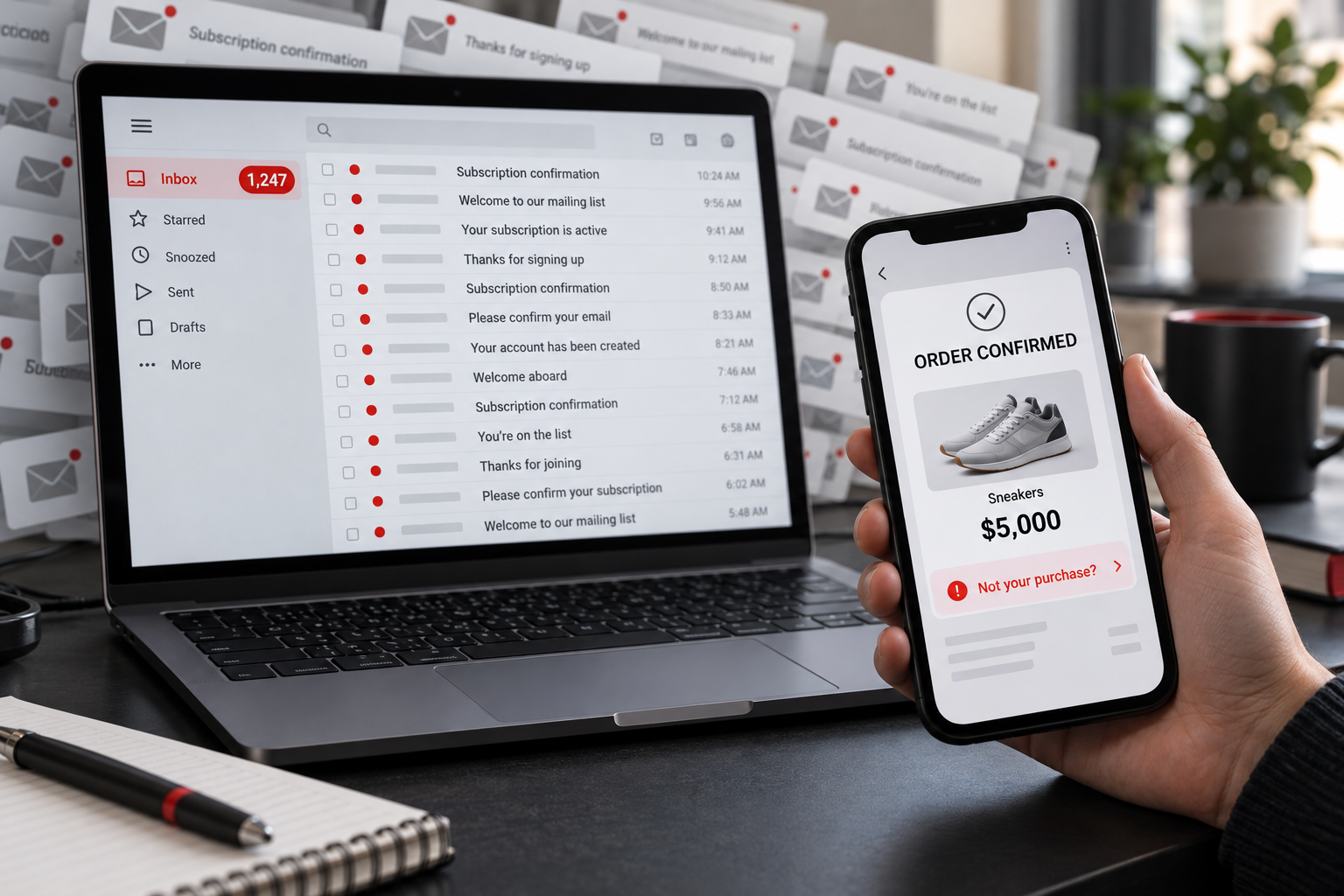
This may be a criminal tactic called spam bombing; also known as email bombing or subscription bombing. Criminals sign your email address up for multiple online services to overwhelm your inbox. While you're distracted sorting through the clutter, criminals complete purchases with your stolen payment information.
What Is a Spam Bomb?
A spam bomb is a deliberate flood of unwanted emails that overwhelms an inbox. Attackers use automated tools to submit someone’s email address to newsletters, registration forms, and subscription services. Those websites then send confirmation and welcome messages.
Many messages come from legitimate businesses and that is what makes this different from a typical phishing campaign. These emails are legitimate versus deceptive phishing emails. A spam bomb is differnt as they can bury/hide purchases, account changes, or security alerts.
How Email Bombing Can Hide Credit Card Fraud
On our Uninterrupted podcast, 4BIS's COO, Jon Fausz shared an incident involving a family member.
Someone stole their credit card information and ordered thousands of dollars in shoes. Around the same time, unwanted emails flooded their inbox. The family member eventually found the purchase receipts among those messages.
The bank ultimately covered the fraudulent transactions, but resolving the situation was incredibly stressful and took considerable effort. They had to locate the receipts, help with the investigation, cancel the compromised card, and arrange for a replacement.
Jon also described a client incident involving an approximately $5,000 fraudulent transaction. In that case, attackers flooded several email accounts to distract from what they were doing.
When thousands of messages interrupt your day, cleaning up feels not annoying but maybe even urgent. Checking whether someone just ordered merchandise with your credit card might never cross your mind.
Does Receiving a Lot of Junk Mail Mean Someone Hacked Your Email?
No, everyone gets some level of junk mail.
However, someone may have stolen your payment information or accessed a shopping account that stores your card. We recommend you treat the flood of emails as a warning to check for unauthorized activity.
If you discover unfamiliar logins, missing messages, or account changes, tell your IT team immediately. Check out our article on what users need to know about business email compromise explains related email security concerns.
What Should You Do During a Spam Bomb?
Start with the accounts and transactions that could cost you money. You don’t need to read every newsletter before taking action.
1. Check your accounts directly
Open your banking app and review recent transactions, including pending charges. Then check shopping accounts with saved payment methods. Look for unfamiliar orders, shipping addresses, gift card purchases, and changes to your account information.
Use your usual apps or enter the website address yourself. Avoid following links in unexpected messages to investigate what is going on.
2. Contact your bank about unauthorized charges
If you find a purchase you didn’t make, contact your bank or card issuer through its app or the number on your card. Explain the transaction and mention the flood of emails. Ask what steps you should take to secure the card and dispute the charge.
3. Keep messages that could explain what happened
Wait befored deleting your email messages. Search for words such as “receipt,” “order,” “payment,” “shipping,” and “password.” Keep messages related to unfamiliar purchases or account changes. Note when the flood started and what you discovered.
Searches can help narrow the pile, but they won’t necessarily uncover everything. Check activity inside your other accounts as well.
4. Tell your IT or cybersecurity team
If the attack affects your work email, report it promptly. Share the start time, affected accounts, and any suspicious activity you found. Your team can investigate account access, review email settings, and help manage the messages without losing useful evidence.
A written incident response plan gives employees a clear contact and a process to follow when something unusual happens.
5. Verify anyone who offers unexpected help
Microsoft has documented attacks that combine email bombing with support impersonation. Criminals create disruption, then approach the victim as someone who can fix it.
Be cautious if someone contacts you claiming to work in IT and offers to stop the emails. Contact your IT team through a known number or established help desk. Don’t approve remote access or share verification codes because an unexpected caller offers assistance.
Why Didn’t the Spam Filter Catch Everything?
Many spam bomb messages come from real websites sending legitimate subscription confirmations. That complicates filtering because the emails may lack the malicious attachments or deceptive links that security tools typically examine.
Email security tools can help detect and manage these attacks, but capabilities vary. Ask your provider what your current system covers.
4BIS’s email security solutions can form part of a broader approach to protecting business communication.
Can You Prevent Email Bombing?
You can’t control every website where someone might enter your address. You can, however, strengthen the accounts criminals may try to exploit.
Start with a unique password for every account. If you’ve reused passwords, prioritize email, banking, business applications, and shopping accounts with saved cards. A password manager makes that work easier to maintain.
Enable multifactor authentication (MFA) wherever available. MFA adds a layer of protection against unauthorized account access. It won’t stop someone from submitting your address to subscription forms, but it does make it more challenging for them to gain access.
Review your transaction notification settings as well. An app notification or text alert gives you another place to notice a purchase when email becomes difficult to use.
For more ways to protect business accounts, read our email security strategies for businesses.
Common Questions About Spam Bombs
Should I unsubscribe from every email?
Focus on checking for fraud before unsubscribing. Avoid clicking through thousands of unfamiliar messages. Your IT team can help identify legitimate subscriptions and manage the cleanup.
Will changing my password stop a spam bomb?
Changing your password won’t stop automated subscription requests. Change it if you suspect account compromise or have reused it elsewhere, and review your account security settings.
What if I don’t find a fraudulent purchase?
Keep monitoring your accounts and involve your IT team if the flood continues.
Get Help With Suspicious Email Activity
For Greater Cincinnati businesses, an overwhelmed inbox can interrupt customer communication, purchasing, and everyday work before anyone understands the cause.
4BIS Cyber Security & IT Services helps businesses address email security and broader cybersecurity risks. Explore our Cincinnati cybersecurity services, or use our 24/7 cybersecurity emergency contact page if you suspect an active compromise.