Protect Your Business: Steps to Stop Browser Cyberattacks
Businesses rely on web browsers to access email, cloud applications, collaboration tools, and company systems. Web browsers link straight to key business systems. Hackers target browsers as top ways into your network.
One bad site, fake link, or rogue extension can steal logins, grab accounts, or plant malware on networks.
Why Does a Browser Based Cyberattack Occur?
Hackers use browser-based cyberattacks by targeting web browsers to steal credentials, route users to phishing sites, or push malware through infected webpages.
Attackers can sometimes gain entry to business systems without getting into the network itself. Browsers hold passwords and link to cloud apps, so attacks kick off when workers click phishing links or add risky extensions.
These attacks often happen when employees:
- Click phishing links
- Install malicious browser extensions
- Visit compromised websites
- Download fake browser updates
- Log into fake login portals
This is why browser security is now considered a critical part of modern cybersecurity strategies.
Why Browsers Are a Major Security Risk for Businesses
Modern browsers almost function like lightweight operating systems. They run applications, store credentials, and connect directly to sensitive business platforms.
Attackers exploit browsers to:
- Steal saved passwords
- Capture session tokens
- Install malicious extensions
- Redirect employees to phishing pages
- Deliver malware through drive by downloads
Successful attackers have access to business systems such as Microsoft 365, accounting platforms, customer databases, or internal cloud applications.
Strong Cybersecurity Protections
Browser security covers tools and rules that block phishing scams, harmful add-ons, login theft, and web-based malware. Our blog comparing modern browser security shows how these differences help companies pick secure and effective options.
Organizations who invest in strong cybersecurity protections can significantly reduce the risks associated with browser attacks. Businesses seeking guidance often work with expert cybersecurity providers offering to strengthen their security posture.
Do you want to know more about the differences between top browsers? Read our blog article about Edge vs. Chrome.
Signs Your Business May Experiencing a Browser Attack
Browser compromises often appear as minor technical issues at first. However, small warning signs may indicate a larger security problem.
Unexpected Login Prompts
Employees may suddenly be asked to log in again to services they normally access automatically.
This can happen when attackers attempt to capture credentials through phishing pages.
Unknown Browser Extensions
Malicious extensions are commonly installed silently and begin collecting data such as passwords, browsing history, or form entries.
If unfamiliar extensions appear (or any other unusal behavior), it may indicate a compromise.
Search Results Redirecting
Redirected search results or unusual advertisements may signal browser hijacking malware. These redirects often send users to malicious websites.
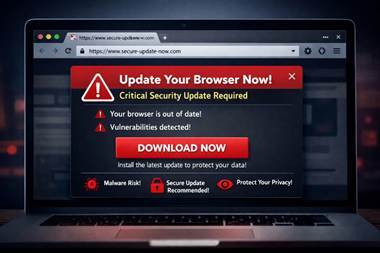
Fake Browser Update Alerts
Attackers sometimes display popups claiming the browser needs an urgent update. Downloading these updates may install malware.
Employees should only install updates through official browser update mechanisms.
Suspicious Login Alerts
Notifications about logins from unfamiliar devices or locations may indicate that attackers have gained access to saved credentials. You’ll want to contact a cybersecurity expert immediately for specific advice with your situation.
Disconnect the Affected Device
Removing the device from the network prevents attackers from accessing additional systems.
Notify Your IT or Cybersecurity Provider
Your IT team should investigate the device, browser logs, installed extensions, and network activity.
Organizations without internal security teams may need professional incident response support.
Secure Potentially Compromised Accounts
Immediately protect any accounts that may have been exposed by:
- Resetting passwords
- Enabling multifactor authentication
- Reviewing login activity
Preserve Evidence
Keep suspicious files or wiping devices before a security investigation begins. Logs and browser artifacts are often essential for identifying how attackers gained access.
How Cybersecurity Experts Investigate Browser Attacks
When cybersecurity professionals respond to a browser incident, they focus on identifying the entry point and containing the threat.
Investigations typically include:
1. Perform analysis of Browser Extensions- Security analysts review installed extensions to identify unauthorized or malicious software.
2. Credential and Session Monitoring- Experts determine whether attackers stole credentials or hijacked authentication sessions.
3. Endpoint and Network Forensics- Logs and system activity are analyzed to determine whether attackers moved beyond the browser into other systems.
4. Threat Removal and System Hardening- Once the attack is contained, security teams remove malicious components and strengthen security controls to prevent future incidents.
Businesses often combine incident response with managed IT security services such as improving long term protection.
How Businesses Can Prevent Browser Based Cyberattacks
While browser attacks are increasing, many can be prevented through stronger security practices.
Organizations should implement:
- Multifactor authentication across all cloud platforms
- Restrictions on browser extensions
- Endpoint detection and response tools
- Employee phishing awareness training
- Regular browser and software updates
Cybersecurity monitoring solutions that detect unusual login activity or suspicious behavior can also help identify threats earlier.
Frequently Asked Questions About Browser Security
Are browser extensions safe for business use?
Some extensions are safe, but malicious extensions are a growing cybersecurity threat. Businesses should limit which extensions employees can install and regularly audit browser environments.
Can hackers access company systems through a browser?
Yes. Attackers can steal saved credentials or session cookies to access cloud services such as email, CRMs, or access document storagage CRMs.
What is the most common browser attack?
Phishing attacks are the most common browser-based threat. These attacks trick users into entering login credentials on fake websites that look legitimate.
Should businesses monitor browser security?
Yes. Browsers are now one of the primary entry points for cyberattacks. Monitoring browser activity and enforcing security policies helps reduce risk.
When Suspicious Browser Activity Appears, Investigate Quickly
Many cyber incidents start with something small: a suspicious link, a strange login prompt, or a new browser extension.
Ignoring these warning signs can allow attackers to remain inside your systems longer and cause greater damage.
If your employees report unusual browser behavior or suspicious login alerts, investigating quickly is the safest approach.
Contact a Cybersecurity Incident Response Team
If your business suspects a cyberattack or browser compromise, 4BIS runs a 24/7 emergency cybersecurity hotline. It helps firms contain and check threats fast.
Acting quickly can prevent a browser incident from becoming a full-scale security breach.