Man-in-the-Middle Attacks and How to Protect Against Them
A man in the middle or MITM attack is a sneaky way for hackers to steal data. They position themselves between you and a site to steal your login or bank info.
These days, many of these tricks use AI to hide from you. As a result, most people don't know it is happening. We will help you see how these attacks work and how to stop them. You can take simple steps right now to keep your web traffic safe.
What Is a Man-in-the-Middle (MITM) Attack?
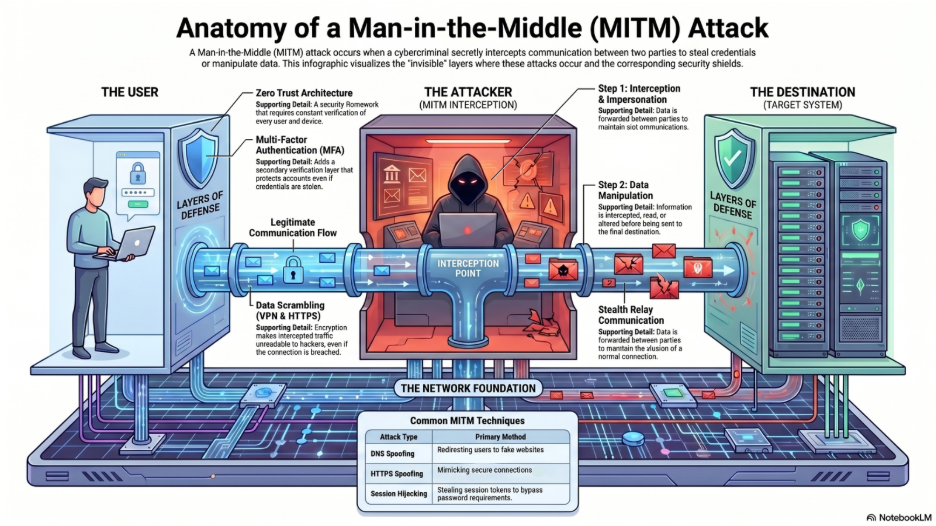
A man-in-the-middle attack occurs when a cybercriminal secretly intercepts communication between two parties, such as a user and a website, without the user realizing it. A hacker positions themselves between you and a system you trust to steal or manipulate data in real time.
Instead of communicating directly with a legitimate service, like your bank, your data routes through the attacker. This allows them to:
- Steal login credentials
- Capture financial information
- Modify transactions
- Inject malicious code
- Monitor sensitive communications
These attacks strike without notice as victims rarely know their data is stolen.
How Do MITM Attacks Work?
MITM attacks rely on deception and interception. The attacker wants both sides of the chat (users or endpoints) to think all is fine.
Step-by-step breakdown:
- Interception
The attacker gains access to your connection, often through unsecured Wi-Fi, compromised networks, or spoofed systems.
- Impersonation
The attacker pretends to be the destination system, such as your bank or email provider.
- Data Capture or Manipulation
Information sent between you and the system is intercepted, read, and sometimes altered.
- Relay Communication
The attacker forwards data between both parties to avoid detection. This process allows attackers to operate invisibly while collecting valuable data.
Common Types of MITM Attacks
MITM attacks can take many forms, but the most common techniques include:
1. Public Wi-Fi Eavesdropping
Hackers create or exploit unsecured Wi-Fi networks to intercept traffic. For example, a fake network labeled “Free Airport Wi-Fi” may actually be controlled by an attacker.
2. DNS Spoofing
This technique redirects users from legitimate websites to malicious ones by altering domain name system records.
Example:
You type in your bank’s website, but are silently redirected to a fake version designed to steal your credentials.
3. HTTPS Spoofing
Attackers trick users into believing they are on a secure site by mimicking HTTPS connections, sometimes using fraudulent certificates.
4. Session Hijacking
Once you log into a site, attackers steal your session token to gain access without needing your password.
5. Email Hijacking
Attackers intercept and manipulate business email communications to redirect payments or steal sensitive data.
Why MITM Attacks Are Increasing
Several factors are contributing to the rise of MITM attacks:
Employees accessing corporate systems from home or public networks create more opportunities for interception.
2. Increased Use of Public Wi-Fi
Coffee shops, airports, and hotels provide convenient but often insecure connections. Stick to your phone's data plan instead. Or use a VPN to block the spies.
3. AI-Enhanced Cybercrime
Attackers now use AI to create more convincing phishing sites, automate attacks, and identify vulnerabilities faster.
4. Over-Reliance on Trust Indicators
Users often assume a site is safe if it looks right, making them vulnerable to spoofed interfaces.
How to Detect a MITM Attack
MITM attacks are designed to be invisible, but there are warning signs to watch for:
- Unexpected SSL certificate warnings
- Websites that look slightly different than usual
- Frequent disconnects or slow network performance
- Being logged out of accounts unexpectedly
- Suspicious redirects when entering URLs
If something feels off, pause and trust your instincts. Remember to verify information before continuing.
How to Protect Yourself from MITM Attacks
Preventing MITM attacks requires a combination of awareness, tools, and best practices.
1. Avoid Unsecured Public Wi-Fi
Public networks are one of the biggest risks.
Best practice:
- Use your mobile hotspot when accessing sensitive data
- Avoid logging into banking or business systems on public Wi-Fi
2. Verify Website Security
Before entering credentials:
- Check for HTTPS in the URL
- Look for the padlock icon in your browser
- Double-check domain names for subtle misspellings
Example:
A fake site might use “arnazon.com” instead of “amazon.com”
3. Use Multi-Factor Authentication (MFA)
Hackers grab your username and password all the time. They snag them from data breaches or fake login pages and you might not even know it happened.
That's where multi-factor authentication can add a layer of security as you prove who you are in more than just your password.
MFA typically uses a changing code sent to your phone or your fingerprint, which is something you are.
4. Use a Trusted VPN
A Virtual Private Network encrypts your internet traffic, making interception much harder. Not all VPNs offer the same level of security. Free VPN services may log or sell your data.
Best practices include:
- Use a reputable, business-grade VPN
- Avoid unknown or free providers
5. Keep Software and Devices Updated
Updates often include security patches that protect against known vulnerabilities.
- Enable automatic updates
- Regularly update browsers, operating systems, and apps
6. Implement Zero Trust or SASE (For Businesses)
Organizations should take a more advanced approach to network security.
Secure Access Service Edge and Zero Trust architectures help:
- Verify every user and device
- Encrypt all traffic
- Reduce reliance on traditional network perimeters
This is especially critical for remote or hybrid work environments.
7. Educate Employees and Users
People's mistakes are still the top security weakness. Training must cover being able to spot phishing tries attempts.
MITM Attacks vs. Phishing: What’s the Difference?
Telling these two online threats apart is often quite hard. Phishing uses fake messages to fool you into sharing private details. A man-in-the-middle attack grabs your data while it moves across a network. These two methods often work together to make stealing your private account login even easier.
You might click a bad link found inside an email scam. From there, a hidden watcher captures everything you type on a fake site.
Stay Vigilant in a Connected World
Man-in-the-middle attacks are dangerous because they exploit trust and they don’t rely on breaking systems or holding your system ransom. They rely on quietly inserting themselves into normal interactions.
Before you connect, click, or enter sensitive information, take a moment to pause. That small pause can be the difference between staying secure and becoming a victim.
Key Takeaways
- A man-in-the-middle attack intercepts communication between two parties
- Common methods include public Wi-Fi attacks, DNS spoofing, and session hijacking
- Warning signs include SSL errors, redirects, and unusual behavior
- Protection strategies include avoiding public Wi-Fi, using MFA, and verifying URLs
- Businesses should implement advanced security frameworks like SASE and Zero Trust
Check 4BIS Cyber Security resources for more on cyber threats, best practices, and examples.