Scammers are using AI to write polished, personalized phishing emails, so the spelling and grammar mistakes that once gave them away are disappearing. The UK's National Cyber Security Centre and the FBI warn that AI makes fraudulent messages more convincing and harder to identify.
For years, one of the most common tips for spotting a scam email was simple: look for bad spelling and awkward grammar. A legitimate bank, vendor, or coworker would write professionally, the thinking went, while a message full of mistakes was probably fake.
That advice is no longer enough.
Scammers now use generative AI to write clear, convincing emails in seconds. The typos and strange phrasing that used to expose phishing attempts may be gone. Worse, criminals can tailor a message using information from your company website, social media, LinkedIn profiles, job postings, and press releases. The result may sound like it came from a vendor, executive, or coworker your team already knows.
For businesses in Cincinnati and beyond, the lesson is straightforward: a professional-looking email is not necessarily a safe email.
Why the Old Advice Stopped Working
Spelling and grammar used to be useful warning signs because many scam messages were poorly written or badly translated. AI has largely removed that barrier.
The UK's National Cyber Security Centre has warned that generative AI can help attackers create convincing phishing material without the translation, spelling, and grammatical mistakes that traditionally revealed a scam. The FBI likewise warns that criminals use generative AI to make fraudulent communication more believable and to support impersonation, social engineering, and financial fraud.
That does not mean a message with errors is safe. It means that clean writing is no longer proof that a message is legitimate.
Why AI Phishing Emails Are So Convincing
Consider a finance employee who receives an email that appears to come from a real supplier. It mentions a current project and asks that the next invoice be paid to a new bank account. The tone sounds right. The grammar is perfect. The supplier's name is correct. The only problem is that the supplier never sent it.
- The writing is polished. AI can produce a professional business email in almost any tone, language, or style.
- The details can be personal. An attacker can use public information to include real employee names, job titles, vendors, projects, or company events.
- The message can mimic a familiar situation. Invoice questions, document-sharing notices, password resets, delivery problems, and executive requests all fit naturally into a busy workday.
- Attackers can operate on a greater scale. AI makes it faster and cheaper to create many tailored messages instead of sending one generic scam to everyone.
This type of attack is often called business email compromise, and one successful message can lead to a major financial loss.
The Financial Impact Is Already Significant
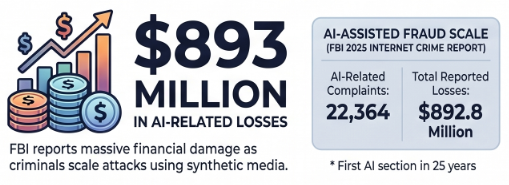
The FBI's 2025 Internet Crime Report included a dedicated section on artificial intelligence for the first time in the report's nearly 25-year history. According to the FBI, AI-related activity accounted for 22,364 complaints and nearly $893 million in reported losses.
Those figures cover more than phishing alone, but they show how quickly criminals are incorporating AI into fraud. The FBI also notes that scammers use pressure tactics along with fake profiles, voice clones, fraudulent identification documents, and convincing synthetic videos.
Your Spam Filter Will Not Catch Everything
Email security remains essential. Spam filtering, link protection, attachment scanning, domain authentication, and threat detection can block a large share of malicious messages.
But no filter is perfect. A personalized email that contains no obviously malicious attachment or link and simply asks the recipient to take an action may look like an ordinary business conversation. That is why cybersecurity needs both technical safeguards and employees who know how to verify unusual requests.
Think of your team as an important layer of defense, not the only layer.
It Is Not Just Email
AI is also making phone, voicemail, text, and video scams more convincing. The FBI has warned that criminals can use AI-generated voices to impersonate government officials, executives, coworkers, friends, or family members.
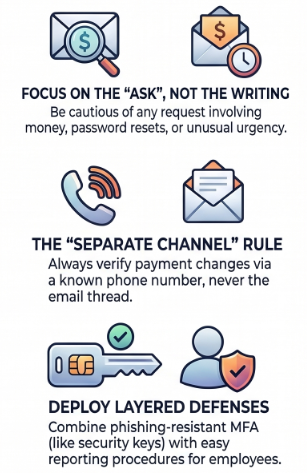
The safe response is the same regardless of the channel: if someone unexpectedly asks for money, login information, a verification code, or sensitive data, stop and verify the request using contact information you already trust.
Do not call a number included in the suspicious message. Do not continue the same email thread. Contact the person through a known phone number, a previously verified account, or an established internal process.
Phishing Warning Signs That Still Matter
If you can no longer judge a message by how it is written, focus on what it asks you to do. Be cautious when a message:
- Requests money, gift cards, cryptocurrency, or payment to a new account
- Asks for a password, login, multifactor authentication code, or personal information
- Creates unusual urgency, pressure, secrecy, or fear
- Requests a change to a vendor's payment or bank information
- Includes an unexpected link, attachment, QR code, or document-sharing invitation
- Uses a familiar display name but an unfamiliar or misspelled email address
- Moves a conversation to a different phone number, email address, or messaging platform
- Bypasses your company's normal approval process
The rule to teach your team is simple: when a message involves money, access, sensitive information, or a change in process, slow down and verify it before acting.
How to Protect Your Business
1. Verify Financial and Login Requests Through a Separate Channel
If an email asks your team to change bank details, send a payment, disclose a verification code, or reset access, contact the requester through a known and trusted method. Never rely on contact information supplied in the message being verified.
2. Require Verification for Every Payment Change
Create a written rule requiring employees to confirm all new or changed payment instructions by phone using a previously verified number. Apply the rule even when the request appears to come from an executive or long-time vendor and especially when it is urgent.
3. Update Security Awareness Training
Do not teach employees that poor spelling is the main sign of phishing. Train them to examine the request, sender address, destination link, timing, urgency, and whether the message follows normal business procedures. Regular phishing simulations can help employees practice these habits.
4. Use Phishing-Resistant Multifactor Authentication
Passkeys and security keys offer stronger protection against phishing than codes delivered by text message or generated by an authenticator app. Where those options are not yet available, use multifactor authentication and make sure employees know never to share an authentication code.
5. Make Suspicious Messages Easy to Report
Give employees a simple way to report a questionable email, text, or call. Encourage them to check without embarrassment or fear of punishment. A false alarm is far less costly than an unreported compromise.
6. Layer Your Technical Defenses
Use business-grade email security, endpoint protection, identity controls, backups, monitoring, and documented incident response procedures. No single product stops every attack, but layered controls can prevent one mistake from becoming a business-wide incident.
7. What to Do If Someone Clicks
If an employee clicks a suspicious link, opens an unexpected attachment, enters a password, or approves an unfamiliar login, report it immediately. Quick action may allow your IT or cybersecurity team to reset credentials, revoke active sessions, isolate a device, block a sender, and limit damage.
Frequently Asked Questions
Can You Still Spot a Phishing Email by Bad Spelling and Grammar?
Not reliably. A message with obvious errors may still be suspicious, but attackers can now use AI to produce clean, professional writing. Judge the message primarily by its sender, context, links, and requested action.
What Phishing Warning Signs Still Work?
Watch requests involving money, new payment details, passwords, verification codes, sensitive data, unexpected files or links, and pressure to act quickly or secretly. These warning signs remain useful regardless of how polished the writing appears.
Is AI-Generated Phishing More Effective?
AI can make phishing more convincing, personal, and scalable. It removes many language errors, helps attackers tailor messages to a target, and can support impersonation across email, text, voice, and video. That can make fraudulent messages harder for both people and security systems to identify.
Will a Spam Filter Stop AI Phishing?
Email security will block many threats, but it cannot catch every personalized message, particularly one without a clear malicious link or attachment. Businesses need layered security, strong verification procedures, and trained employees.
What Should an Employee Do If a Message Might Be a Scam?
Pause and verify the request through a separate, trusted channel. Call a known number or contact the person through an established internal method. Then report the message to your IT or cybersecurity team, even if it turns out to be legitimate.
Make Your Business Harder to Fool
AI did not invent phishing, but it has made old assumptions dangerous. Your employees should no longer treat polished writing as proof that an email is legitimate. The strongest habits are to slow down, question unusual requests, and independently verify anything involving money, access, or sensitive information.
4BIS helps Greater Cincinnati businesses strengthen email security, employee awareness, identity protection, and incident response. If you are unsure whether your current defenses are ready for modern phishing attacks, reach out today.
Attribution: This article was modified from an article by The Technology Press and Tech Tribe. It is used with permission.